
RADIAL MENU 4IN1
RADIAL MENU 4IN1 is a FiveM script by Risk Scripts, compatible with ESX, QBCore and QBox, available for 19.99 EUR as a one-time purchase. It idles at 0.00ms, ships with free lifetime updates and is supported 24/7 through the Risk Scripts Discord.
RADIAL MENU 4IN1 - features, frameworks and installation
# Radial Menu 4in1 — Four Radial Menu Styles for FiveM
**Four complete radial menus in one script. Every player picks the style and color they like.**
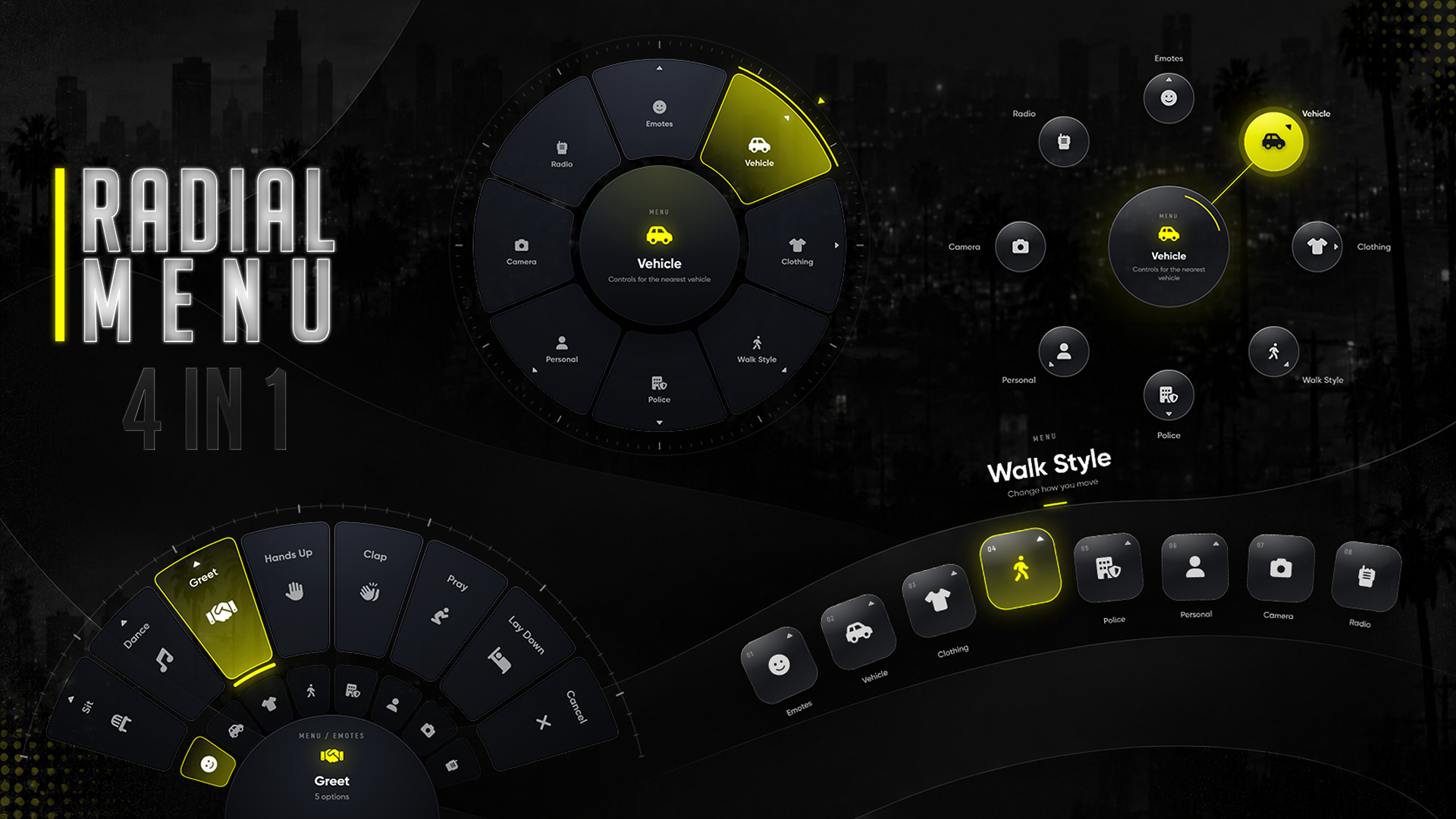
A modern FiveM radial menu for ESX, QBCore and QBox: four different designs, built-in vehicle, clothing and walk style controls, emotes, job menus, and entries that only show up when they actually make sense.
---
## Why this one
Most radial menus give you one look and a list of buttons that is always the same. This one doesn't.
- **Four styles, not one.** Orbit, Nodes, Arc and Fan. You set the default, your players choose their own.
- **Entries appear only when they apply.** By job, grade, gang, duty, item, area or vehicle. No greyed-out buttons, no "you can't do that" spam.
- **Server events are checked on the server.** A job-locked entry cannot be triggered by someone who doesn't have the job.
- **One config file, no code.** A new entry is one line. Submenus go as deep as you want.
- **Nothing moves while you don't.** 0.00ms idle, and the menu stays smooth up to 4K.
---
## Four Styles
| Style | Position | What it looks like |
| --- | --- | --- |
| **Orbit** | Center | Classic full ring around a hub with your name, ID and job |
| **Nodes** | Center | Round glass buttons around a hub, a pointer follows your mouse |
| **Arc** | Bottom | Half ring at the bottom of the screen — submenus open as a second ring |
| **Fan** | Bottom | Glass tiles fanned out at the bottom of the screen |
Selection works like the GTA weapon wheel: you move the mouse in a direction, you don't have to hit a small button. Fast with a mouse, fast without looking.
---
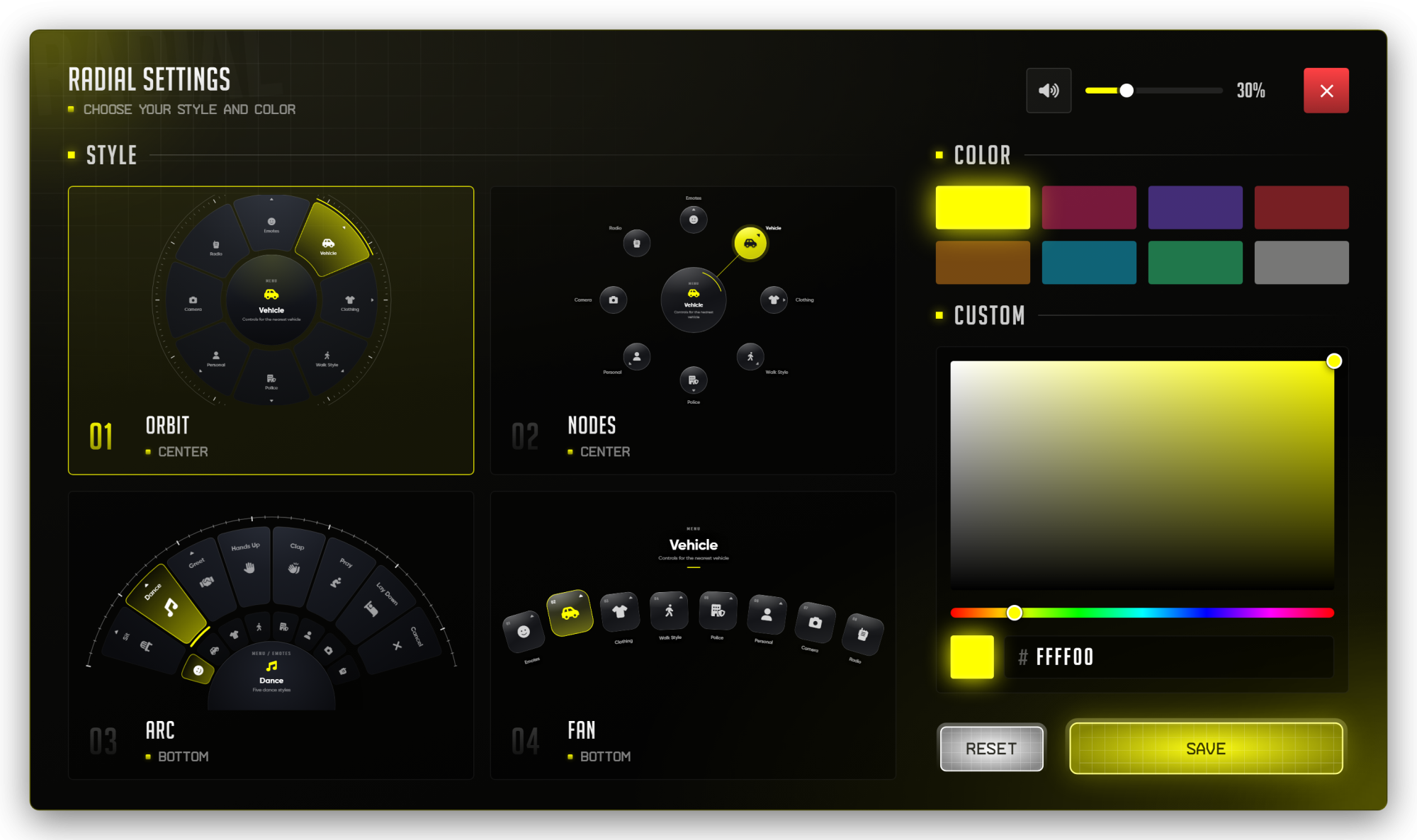
## Player Settings
A small gear on the menu opens the settings panel.
- **Style** — four cards with real live previews of each menu, not screenshots
- **Color** — eight preset colors, plus a full color picker and hex field
- **Sound** — mute button and volume slider
Every change is shown live behind the panel. Settings are saved per player and survive a restart.
Don't want that? One switch turns the panel off and everyone uses your server's style and color.
---
## Smart Visibility
Every entry — and every submenu — can carry its own conditions. Combine as many as you like.
| Option | Shows the entry only… |
| --- | --- |
| `jobs` | for these jobs, optionally from a minimum grade |
| `gangs` | for these gangs, optionally from a minimum grade |
| `onDuty` | while on duty |
| `items` | with these items in the inventory, optionally a minimum amount |
| `zones` | inside named areas you define once, like `mrpd` |
| `vehicle` | near a vehicle, inside, as driver, as passenger or on foot |
| `canShow` | when your own function says so |
```lua
{ label = 'Armory', icon = 'fa-solid fa-gun', command = 'armory', jobs = { police = 2 }, zones = { 'mrpd' } },
```
That's a button only police from grade 2 see, and only inside the station. A submenu with nothing left in it disappears completely.
---
## Built-in Actions
These work out of the box. No extra script needed.
| Category | What's included |
| --- | --- |
| **Vehicle** | Engine, lock, every door, hood, trunk, each window or all at once, seat switch, interior light |
| **Clothing** | Hat, glasses, mask, vest, bag, shoes — take off and put back on |
| **Walk styles** | Any GTA walk style, plus reset |
Toggles show their real state: the engine entry knows whether the engine is running, a door knows whether it's open. Things that don't exist are hidden — a two-door car shows no rear doors, and you can't switch to the seat you're already in.
---
## Connect Anything
Every entry can do one of these:
| Option | What it does |
| --- | --- |
| `command` | Runs any command — inventory, phone, your job scripts |
| `event` | Triggers a client event |
| `serverEvent` | Triggers a server event, after the server checked the conditions again |
| `emote` | Plays an emote through rpemotes, dpemotes or any emote script |
| `action` | Runs your own function |
| `keepOpen` | Keeps the menu open after the click |
> `serverEvent` entries are verified server-side — job, grade, gang, duty, items, area and vehicle, for the entry and every menu above it. Nothing the client sends is trusted.
---
## Toggle or Hold
| Mode | How it feels |
| --- | --- |
| **Toggle** | Press the key to open, press it again to close |
| **Hold** | Hold the key, move the mouse, release — the hovered entry runs |
The key is a real FiveM key binding. Every player can rebind it in the GTA settings.
---
## Built for Your Other Scripts
```lua
-- Open the menu from your own script
exports['risk-radial']:Open()
-- Close it when your own UI opens
exports['risk-radial']:Close()
-- Don't open your menu while the radial is open
if exports['risk-radial']:IsOpen() then return end
```
Need a rule the config doesn't cover? `Config.CanOpen` is your own check before the menu opens — block it while cuffed, in a cutscene, or whatever your server needs.
---
## Compatibility
| | Supported |
| --- | --- |
| **Framework** | ESX · QBCore · QBox — auto-detected at runtime |
| **Inventory** | ox_inventory · codem-inventory · tgiann-inventory · core_inventory · origen_inventory · qb-inventory · framework native |
| **Emotes** | rpemotes · dpemotes · any script with an emote command |
| **Icons** | Font Awesome, every free solid icon |
| **Resolution** | 1080p · 1440p · 4K · ultrawide |
| **Languages** | English · German · Spanish · French · Italian · Dutch · Portuguese |
---
## What You Get
- ✅ Four radial menu styles — Orbit, Nodes, Arc and Fan
- ✅ Player settings panel with live previews
- ✅ Eight preset colors plus a free color picker
- ✅ Menu sounds with mute and volume, per player
- ✅ Unlimited submenu depth
- ✅ Job, grade, gang and duty restrictions
- ✅ Item restrictions with minimum amounts
- ✅ Named zones for location-based entries
- ✅ Vehicle conditions — near, inside, driver, passenger, on foot
- ✅ Built-in vehicle controls with live on/off state
- ✅ Built-in clothing toggles and walk styles
- ✅ Emote support for rpemotes and dpemotes
- ✅ Commands, client events, server events and custom functions
- ✅ Server-side validation for every server event
- ✅ Toggle and hold mode, rebindable key
- ✅ Three client exports
- ✅ 7 languages, every string translatable
- ✅ 0.00ms idle, no database, no dependencies
- ✅ Ready-made example menu with police, EMS and mechanic
---
## Installation
1. Drop `risk-radial` into your resources folder
2. Add `ensure risk-radial` to your `server.cfg`
3. Pick your default style and color in `config/config.lua`
4. Edit your entries in `config/menu.lua` and restart
No SQL, no database, nothing to import. A complete example menu is included.
**Requirements:** ESX, QBCore or QBox
---
## FAQ
**Can every player choose their own radial menu style?**
Yes. The gear icon opens a settings panel with all four styles, the color and the sound. It is saved per player. You can also switch it off and force one style for everyone.
**Does it work with my inventory?**
Yes. `ox_inventory`, `codem-inventory`, `tgiann-inventory`, `core_inventory`, `origen_inventory` and the framework inventory are detected automatically. The inventory file is open, so any other system is one function away.
**Can I add my own buttons?**
Yes. One line in `config/menu.lua`: a label, an icon, and a command, event or function. No code knowledge needed for commands.
**Can I restrict entries to a job or a grade?**
Yes. `jobs = { 'police' }` for the whole job, `jobs = { police = 2 }` from grade 2. Gangs, duty, items, areas and vehicles work the same way.
**Does it work with rpemotes or dpemotes?**
Yes. Emotes run through the command of your emote script. The command name is a config setting.
**Can players abuse job-locked buttons?**
No. Entries that trigger a server event are checked again on the server before anything happens.
**Does it need a database?**
No. There is no SQL and no dependency. Player settings are stored on the player's side.
**Can I translate it?**
Yes. Seven languages ship complete, and every string of the script and the interface lives in a locale file.
| Resource | RADIAL MENU 4IN1 |
|---|---|
| Frameworks | ESX, QBCore and QBox |
| Price | 19.99 EUR, one-time |
| Licensing | Open source and Escrow editions available |
| Idle performance | 0.00ms |
| Updates | Free lifetime updates |
| Support | 24/7 via the Risk Scripts Discord |
| Documentation | Risk Scripts GitBook |
- Does RADIAL MENU 4IN1 work with ESX, QBCore and QBox?
- RADIAL MENU 4IN1 is compatible with ESX, QBCore and QBox. The framework is detected at runtime, so the same download works on every supported server without a separate build.
- Is RADIAL MENU 4IN1 open source or Escrow?
- Risk Scripts offers RADIAL MENU 4IN1 as an open-source edition and as an Escrow edition. In both cases the config files, locale files and the HTML/CSS stay editable.
- How much does RADIAL MENU 4IN1 cost?
- RADIAL MENU 4IN1 costs 19.99 EUR as a one-time purchase. It is also included in the Risk Scripts VIP package, a one-time payment that covers the Escrow edition of every current and future release.
- Does RADIAL MENU 4IN1 affect server performance?
- RADIAL MENU 4IN1 idles at 0.00ms and is profiled under real server load, so it runs alongside a full resource stack without measurable frame cost.
- What support and updates are included with RADIAL MENU 4IN1?
- Every Risk Scripts purchase includes free lifetime updates and 24/7 support through the Risk Scripts Discord, answered directly by the developers who wrote the code.
